I Finally Understood Python's Six Operator Types (and Used Them to Split a Number Into Digits)

A dedicated Computer Engineering graduate from SCET. Throughout my academic journey, I navigated the dynamic landscape of education during the challenging Covid era, which instilled in me resilience and adaptability. My experience in the field of Data Engineering spans across Transact SQL, MS SQL Server, Agile Methodologies, and a foundational understanding of Azure Data Factory and various cloud services. These experiences have not only honed my technical acumen but also reinforced my capacity to thrive in diverse and evolving environments.
My current pursuits reflect a keen interest in expanding my knowledge in both DevOps and Cloud Engineering. Alongside these technical endeavors, I'm fervently learning Full Stack Web Development from the ground up, eager to explore the intricate interplay of front-end and back-end systems.
Embracing a holistic approach to problem-solving, I'm delving into the intricacies of System Design, striving to develop comprehensive and efficient solutions within the IT industry. Building on approximately 6 months to 1-year of hands-on industry experience, I'm driven to continuously enhance my skill set, contributing meaningfully to the technological landscape.
Beyond the realms of technology, I find solace in capturing the ephemeral beauty of sunsets through photography, letting the time freeze those breathtaking moments. Music is my constant companion, offering relaxation and inspiration. As an avid cricket enthusiast, the game brings camaraderie and excitement.
I'm always open to connecting with fellow professionals, learning from shared experiences, and contributing to the ever-evolving tech sphere. Let's connect and explore the limitless possibilities together!
Last post was about literals, the actual values Python works with. This one is about operators, the symbols that let you actually do something with those values.
Term check: operator and operand If you write
a + b,aandbare the operands (the things being acted on), and+is the operator (the symbol defining what action to take). Every operation in Python follows this same shape, just with different symbols and different numbers of operands.
Python groups its operators into six categories, and understanding what each category is for made the whole topic click a lot faster than trying to memorize symbols in isolation.
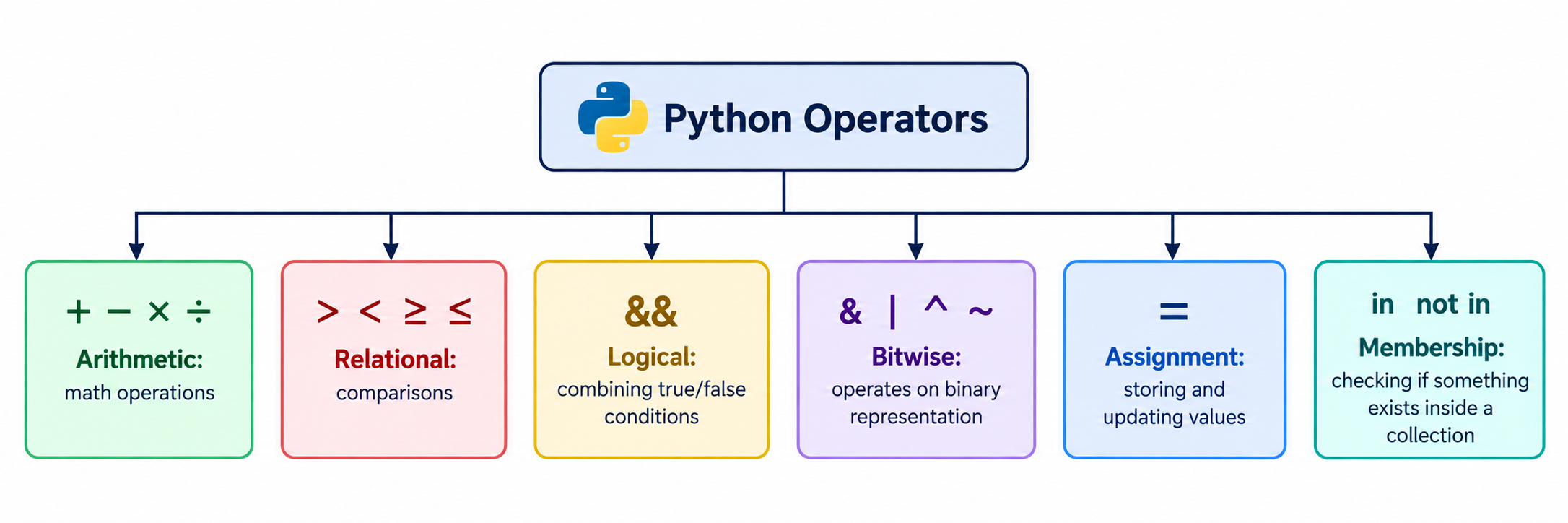
Arithmetic operators
These are the ones you already know from math class, plus two Python-specific ones that trip people up.
print(4 + 3)    # 7, addition
print(4 - 3)    # 1, subtraction
print(4 * 3)    # 12, multiplication
print(4 / 2)    # 2.0, division (always returns a float)
print(4 // 2)   # 2, integer division (drops anything after the decimal)
print(4 % 3)    # 1, modulus (returns the remainder)
print(5 ** 2)   # 25, power (5 to the power of 2)
The one that actually needed a second look: / (regular division) always gives you back a float, even when the numbers divide evenly. // (integer division) throws away the decimal part entirely and gives you a plain integer instead. % (modulus) is the one people forget exists, and it's genuinely useful, it gives you whatever's left over after dividing, which turns out to matter a lot (see the exercise below).
Relational operators
These compare two values and give you back True or False.
print(4 > 5)    # False
print(4 < 5)    # True
print(4 >= 4)   # True
print(4 <= 4)   # True
print(4 == 4)   # True, equality check (note the double equals)
print(4 != 4)   # False, not-equal check
Worth flagging since it's a classic beginner slip: == checks equality, = assigns a value. Mixing these up gives you either a syntax error or, worse, a bug that silently overwrites a variable you meant to compare.
Logical operators
and, or, and not, working exactly like the logic gates from an electronics class, if you've taken one. If not, here's the plain-language version:
print(1 and 0)  # 0, both need to be "true" (non-zero) for the result to be true
print(1 or 0)   # 1, at least one needs to be "true"
print(not 1)    # False, flips true to false and vice versa
Since True behaves as 1 and False as 0 (from the literals post), these logical operators work directly with actual boolean values too, not just the numeric stand-ins:
print(True and False)  # False
print(True or False)   # True
print(not True)        # False
Bitwise operators
These operate directly on a number's binary representation: & (bitwise and), | (bitwise or), ^ (bitwise xor), ~ (bitwise not), << (left shift), >> (right shift). Honestly, I'm not going to pretend this is something I'll reach for constantly. It comes up mostly in specialized situations like image manipulation or working directly with binary data, and the instructor mentioned the same thing, most day-to-day programming won't use these often.
print(2 & 3) # 2, compares binary representations bit by bit
If you're curious how the result gets computed, it converts both numbers to binary and compares them bit by bit, but for a beginner-friendly first pass, knowing these exist and roughly what they're for is enough. I'll come back to this in more depth if a later project actually needs it.
Assignment operators
The plain = you've already been using constantly. But it also combines with other operators as a shorthand:
a = 2
a += 1   # same as writing a = a + 1
print(a)  # 3
The same pattern works for -=, *=, /=, and so on. One thing worth appreciating here: languages like C or Java have separate increment operators like a++, which Python deliberately skipped in favor of a += 1, since it reads more clearly and avoids some genuinely confusing edge cases those shorthand operators can create.
Membership operators
in and not in, and these are the ones that felt the most immediately useful.
print("M" in "Mumbai")       # True
print("d" not in "Mumbai")   # True, lowercase d genuinely isn't in "Mumbai"

numbers = [1, 2, 3, 4]
print(1 in numbers)      # True
print(10 not in numbers)  # True
These check whether something exists inside a string, list, tuple, or other collection, and they're doing it more efficiently than writing a manual loop to search for it yourself, something I'll appreciate more once loops actually show up in this series.
Putting it together: splitting a three-digit number into its digits
Here's the hands-on exercise that made modulus and integer division actually click for me: take a three-digit number from the user, and add up its individual digits.
The trick is that % 10 always gives you the last digit of a number, and // 10 always chops that last digit off. Repeat that twice more, and you've pulled apart all three digits.
number = input("Enter three numbers to perform sum: ")
number = int(number)  # convert from string to int, from the last post's lesson

c = number % 10        # last digit
number = number // 10  # chop off the last digit

b = number % 10        # now-last digit (originally the middle one)
number = number // 10  # chop it off again

a = number % 10        # whatever's left (the first digit)

result = a + b + c
print(result)
Walking through it with 345: 345 % 10 gives 5 (that's c), then 345 // 10 gives 34. 34 % 10 gives 4 (that's b), then 34 // 10 gives 3, which becomes a. Add 5 + 4 + 3 and you get 12, which matches what actually running the program gives you.
The order you extract the digits in doesn't matter for addition, since 5 + 4 + 3 and 3 + 4 + 5 land on the same total either way, which is a small detail but a nice one to notice.
Common mistakes I'd flag here
Mixing up
/and//. If you need a whole number result and accidentally use/, you'll get a float back, which can quietly break code expecting an integer.Confusing
=(assignment) with==(equality check).Assuming bitwise operators are something you need to master immediately. They're real, but they're a narrow tool for a narrow set of problems.
Forgetting that
input()still returns a string (from the previous post), which means the digit-extraction exercise above breaks with aTypeErrorif you skip theint()conversion.
Quick recap
Python has six operator categories: arithmetic, relational, logical, bitwise, assignment, and membership.
/always returns a float,//returns an integer with the decimal dropped, and%returns the remainder, three genuinely different things that are easy to mix up.Relational operators (
>,<,==, and friends) returnTrueorFalse.Logical operators (
and,or,not) combine or invert boolean conditions, and work seamlessly withTrue/Falsesince those behave as1/0underneath.Assignment operators like
+=are shorthand for updating a variable using its own current value.Membership operators (
in,not in) check whether something exists inside a string or collection.Combining
%and//is a genuinely useful pattern for pulling individual digits out of a number, one digit at a time.
What's next
Next up, I'm moving into conditional statements: actually using these comparison and logical operators to make a program branch and make decisions, instead of just running top to bottom.