Python Strings Are Immutable, and It Changed How I Think About Slicing
A dedicated Computer Engineering graduate from SCET. Throughout my academic journey, I navigated the dynamic landscape of education during the challenging Covid era, which instilled in me resilience and adaptability. My experience in the field of Data Engineering spans across Transact SQL, MS SQL Server, Agile Methodologies, and a foundational understanding of Azure Data Factory and various cloud services. These experiences have not only honed my technical acumen but also reinforced my capacity to thrive in diverse and evolving environments.
My current pursuits reflect a keen interest in expanding my knowledge in both DevOps and Cloud Engineering. Alongside these technical endeavors, I'm fervently learning Full Stack Web Development from the ground up, eager to explore the intricate interplay of front-end and back-end systems.
Embracing a holistic approach to problem-solving, I'm delving into the intricacies of System Design, striving to develop comprehensive and efficient solutions within the IT industry. Building on approximately 6 months to 1-year of hands-on industry experience, I'm driven to continuously enhance my skill set, contributing meaningfully to the technological landscape.
Beyond the realms of technology, I find solace in capturing the ephemeral beauty of sunsets through photography, letting the time freeze those breathtaking moments. Music is my constant companion, offering relaxation and inspiration. As an avid cricket enthusiast, the game brings camaraderie and excitement.
I'm always open to connecting with fellow professionals, learning from shared experiences, and contributing to the ever-evolving tech sphere. Let's connect and explore the limitless possibilities together!
Strings showed up back in the data types post as one of nine basic types, but it turns out that was barely scratching the surface. There's a whole world of indexing, slicing, and a genuinely important rule about what you can and can't do to a string once it exists.
Term check: string A string is a sequence of characters. Python specifically stores these as Unicode characters (as opposed to the more limited ASCII character set some other languages default to), which is part of why Python handles things like emoji and non-English text so naturally.
Creating a string, the right way
Single or double quotes both work, but there's a real reason to lean toward double quotes as your default: a string with an apostrophe in it, like it's my car, will break if you wrap it in single quotes, since Python reads that apostrophe as the string ending early.
s = "it's my car"  # works fine
# s = 'it's my car'  # breaks, Python thinks the string ends after "it"
For anything spanning multiple lines, triple quotes are required, the same rule from the literals post:
info = """
My name is Darshan.
I am learning Python.
"""
And if you need to convert some other type into a string, str() handles that directly:
a = 23
print(str(a))  # "23", now a string instead of an int
Accessing characters by index
Every character in a string has a position, starting at 0.
s = "welcome to python"
print(s[0])   # w
print(s[1])   # e
Try to access a position beyond the string's actual length, and Python throws an IndexError: string index out of range. len(s) tells you exactly how long a string is, which is a good habit before indexing into unfamiliar strings.
Python also supports negative indexing, counting from the end instead of the beginning.
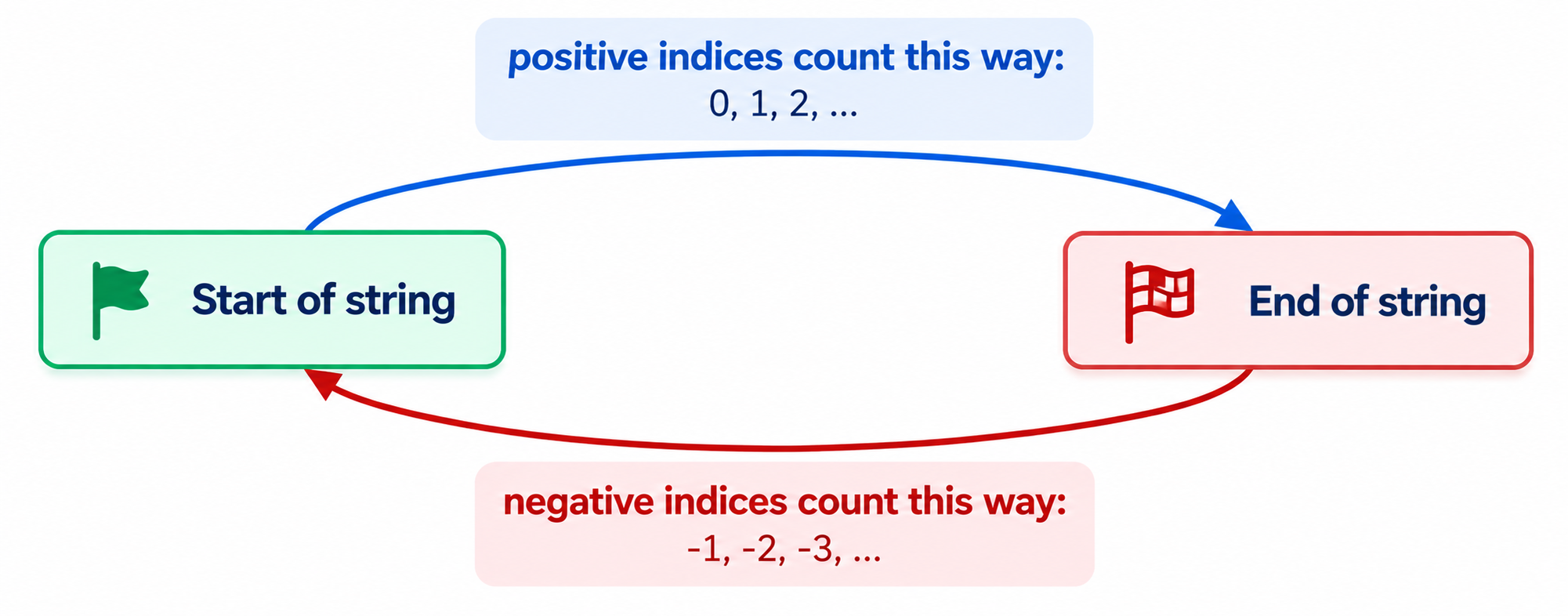
print(s[-1])  # n, the last character
print(s[-2])  # o, second to last
Neither direction is more "correct," positive indexing is often more intuitive, negative indexing is genuinely convenient when you care about something near the end of a string without wanting to calculate its exact length first.
Slicing: pulling out more than one character
Slicing uses a start:stop format inside the brackets, and follows the same rule as range(): the stop position is excluded.
s = "welcome to python"
print(s[0:7])   # welcome
A few shortcuts worth knowing: leaving out the start defaults to 0, leaving out the stop defaults to the end of the string, and leaving out both just returns the whole string.
print(s[:7])    # welcome (same as s[0:7])
print(s[1:])    # elcome to python (everything from index 1 onward)
print(s[:])     # the entire string
You can add a third value for a step, skipping characters:
print(s[0:7:2]) # wloe (every second character within that slice)
Reversing a string with slicing
This is the trick that made slicing click for me. A negative step walks backward instead of forward, and reverses the string entirely when you leave the start and stop empty.
print(s[::-1]) # nohtyp ot emoclew
One rule to keep in mind whenever the step is negative: the logical "start" of your slice needs to be the higher index, and "stop" the lower one, since you're now moving right to left instead of left to right.
Strings are immutable
Term check: immutable Immutable means unchangeable. Once a string is created, you cannot alter its contents, not by adding a character, not by editing one, not by deleting one.
s = "welcome to python"
s[0] = "a"
# TypeError: 'str' object does not support item assignment
Trying to delete a single character fails the same way:
del s[0]
# TypeError: 'str' object doesn't support item deletion
You genuinely cannot modify a string's actual contents in place, ever. What you can do is delete the variable entirely, which removes the reference, not the string's internal contents:
del s
print(s)
# NameError: name 's' is not defined
This distinction, deleting a variable versus modifying a string, matters a lot once list, tuple, set, and dictionary show up later in this series, since some of those types behave very differently on exactly this point.
Common mistakes I'd flag here
Forgetting slicing's stop index is excluded, the same off-by-one trap from
range()showing up again here.Trying to reverse a slice with a negative step but keeping start smaller than stop, which returns an empty result instead of the reversed string.
Attempting to modify a string in place (
s[0] = "x"), forgetting strings are immutable, and getting genuinely confused by theTypeError.Confusing deleting a variable (
del s) with deleting part of a string's contents, which isn't possible at all.
Quick recap
Strings are sequences of Unicode characters, and double quotes are generally the safer default over single quotes.
Every character has a positive index (from the start) and a negative index (from the end).
Slicing (
s[start:stop:step]) extracts a substring, with the stop index excluded, and a negative step reverses direction.s[::-1]is the compact idiom for reversing an entire string.Strings are immutable: no in-place edits, additions, or deletions are possible, only replacing the whole variable or deleting it entirely.
What's next
Next up: string operations, arithmetic, relational, logical, and membership operators, all applied specifically to strings.